A free n8n workflow for the Meta Ad Library
Type a keyword. The workflow reads the ads running for it in Meta's Ad Library, which many still call the Facebook Ad Library. Gemini studies each video, image and text, and a Google Sheet gets one row for each ad. The file is free.
Get the workflow
One file. It holds no key and no account: you add yours after the import.
Free download
Meta ads keyword analyzer
- Download the file, or copy its link.
- In n8n, create a workflow and open the menu at the top right.
- Choose Import from File and pick the download, or Import from URL and paste the link.
https://vexqo.dev/n8n/meta-ads-keyword-analyzer.jsonWhat it does
One run goes from a keyword to a sheet you can sort.

It reads the ads that run now
Up to 200 ads for your keyword and country, the ones with the most impressions first.
It keeps advertisers with a following
Pages under 1,000 likes are dropped. You set the floor.
Gemini studies each ad
It watches the video, looks at the image or reads the text, and answers the same six questions for every ad.
One row for each ad
A summary, the angle, the offer, the hook, what the media shows and the copy rewritten for your brand.
What lands in the sheet
Twenty-two columns for each ad, from three places.
| From | Columns |
|---|---|
| The Ad Library | The advertiser, its page likes, the format, the start day, the days the ad has run, its text, title, button, link and platforms. |
| Gemini | A summary, the angle, the offer, the hook, what the image or video shows, and the copy rewritten for your brand. |
| The workflow | The day the ad was found, links to the ad, its page and its media, the ad ID, and a note when Gemini could not study the ad. |
Sort by days_running first. An advertiser rarely keeps paying for an ad that does not work.
Set it up
Three accounts: vexqo for the ads, Google Gemini for the study, Google Sheets for the rows.
- Get a vexqo API key. The trial is free and has 500 credits.
- Open Search the Meta Ad Library and create a Header Auth credential: name
X-API-Key, value your key. - Open Watch the video, Look at the image and Read the text, and pick a Google Gemini credential in each. A key from Google AI Studio works.
- Connect Add to the sheet to a Google Sheet. Its first row needs the column names, which note 4 in the workflow lists.
- Open What to look for, set your keyword, your country and a sentence about your brand, and run it.
How it looks in n8n
Seventeen steps in four groups. Each group has a note that says what it does and what you can change.
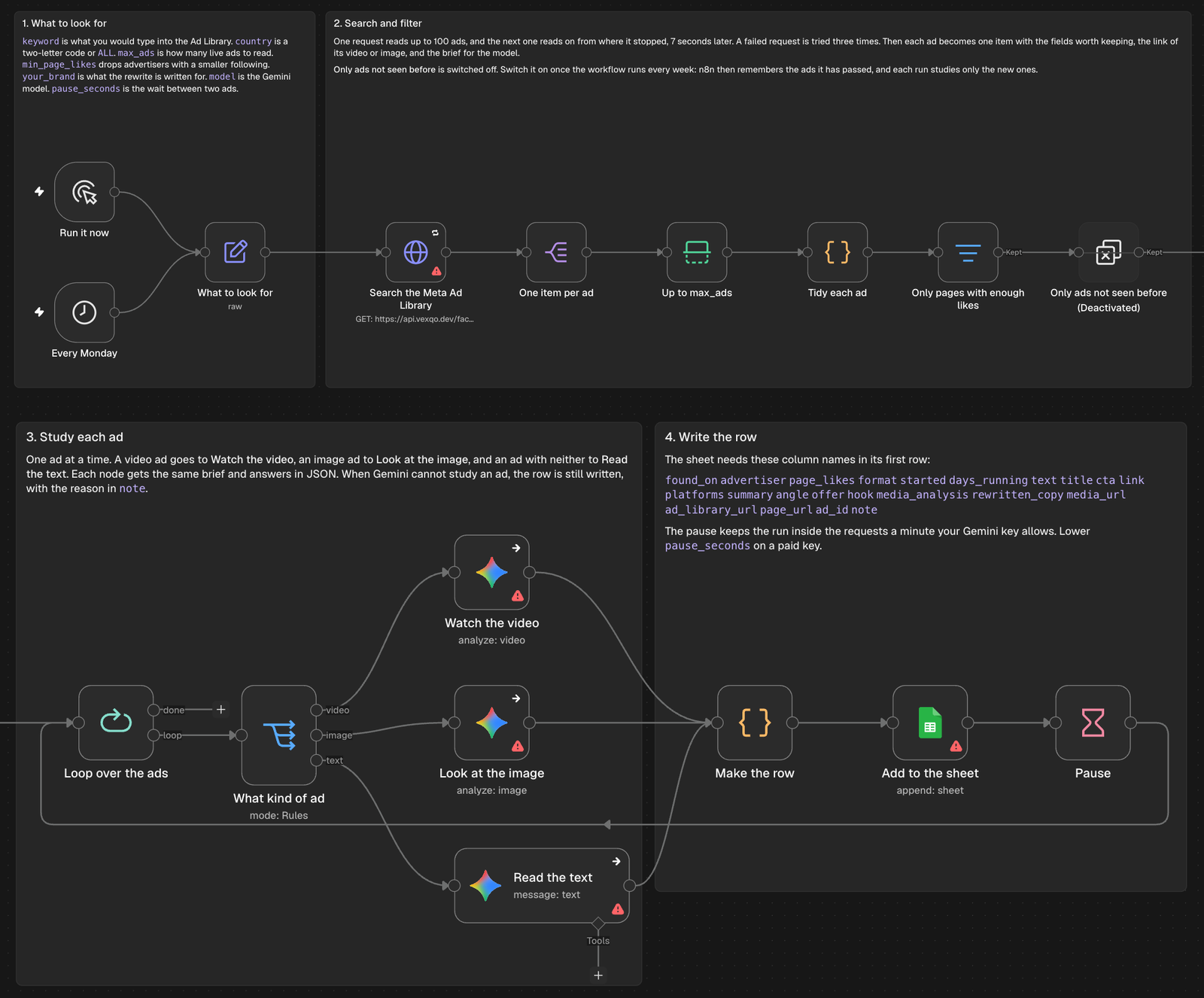
| Setting | What it sets | In the file |
|---|---|---|
keyword | What you would type into the Ad Library. | collagen powder |
country | A two-letter code, or ALL. | US |
max_ads | How many running ads to read. | 200 |
min_page_likes | Advertisers with fewer page likes are dropped. | 1,000 |
your_brand | One sentence about your brand. The rewrite is written for it. | yours |
model | The Gemini model that studies the ads. | gemini-3.6-flash |
pause_seconds | The wait between two ads, to stay inside the requests a minute your Gemini key allows. | 6 |
Two more things are in the file. A trigger runs the workflow every Monday at 8, next to the one you start by hand. And a step named Only ads not seen before is switched off: switch it on once the weekly run works, and each run studies only the ads that are new.
What it costs
The file is free. A run uses three things.
vexqo credits
1 credit for every 10 ads: 20 credits for a run of 200. The free trial has 500, and packs start at $49 for 20,000.
Gemini
Google bills each ad Gemini studies. A video costs more than an image, and an image more than text.
n8n
Your own, in the cloud or self-hosted. The workflow uses built-in nodes only.
Time
With 6 seconds between two ads, 200 ads take at least 20 minutes. A paid Gemini key allows a shorter pause.
What we ran
On n8n 2.48.7 on 20 November 2026, against the live API, for the keyword in the file.
- The search read 200 ads in two requests, in 44 to 50 seconds. No ad came twice.
- With the floor at 1,000 likes, 107 of 130 ads stayed.
- With no floor, 130 ads became 130 rows: 75 video ads, 52 image ads and 3 with text only.
- With a Gemini key that Google refuses, every ad still got its row, with the reason in the note column.
- The whole workflow, with a working Gemini key and a Google Sheet, then ran on a hosted n8n.
Limits
- It reads the ads that run now. The library keeps stopped ads only where they ran in the EU or the UK.
- The likes are those of the Facebook page. A brand that lives on Instagram can fall under the floor, so lower
min_page_likesfor those. - For a carousel or a catalog ad, Gemini studies the first card.
- Gemini can misread an ad. Each row links to the ad, so check it before you act on it.
- The library does not publish spend, clicks or sales, so no row has them.
Using a coding agent instead of n8n? Connect vexqo to Claude Code, Codex or Cursor. For what to look for in the rows, read how to get value from your competitors' Meta ads.
Questions
Is it free?
The file is free, and you may change it. A run uses vexqo credits, of which the trial gives 500, Gemini usage that Google bills, and your n8n.
Do I need a Meta developer account?
No. The workflow needs no Meta app, no review and no access token.
Is this a Facebook Ad Library scraper for n8n?
It does the job people look for one to do: it returns the ads as data. You do not run or rent a scraper. The workflow makes one request to the vexqo API, and the API answers with the ads.
Can I use OpenAI or Claude in place of Gemini?
For the image and the text steps, yes: swap the node and keep the brief. The video step needs a model that takes a video file, which is why the file uses Gemini for all three.
Can I follow named competitors instead of a keyword?
Yes. The search also takes the ID of an advertiser's page. In the search step, send page_id in place of q.
Does it run on n8n Cloud and on a self-hosted n8n?
It uses built-in nodes only. We ran it on a self-hosted n8n 2.48.7 and on a hosted one.
Run it on your own keyword
The trial is free and has 500 credits. A run of 200 ads costs 20.
Get an API key